To disavow backlinks, list the bad URLs or domains in a UTF-8 .txt file and upload it in Google's disavow links tool for a URL-prefix property. The tool is for a narrow case, though. Google says most sites don't need it, so disavow only when manipulative links caused, or will likely cause, a manual action.
Last updated: November 9, 2026
Every rule below comes from Google's own help pages, which we read on November 9, 2026. Here because a tool flagged "toxic" links? Start with the decision tree. Often the right answer is to do nothing at all.
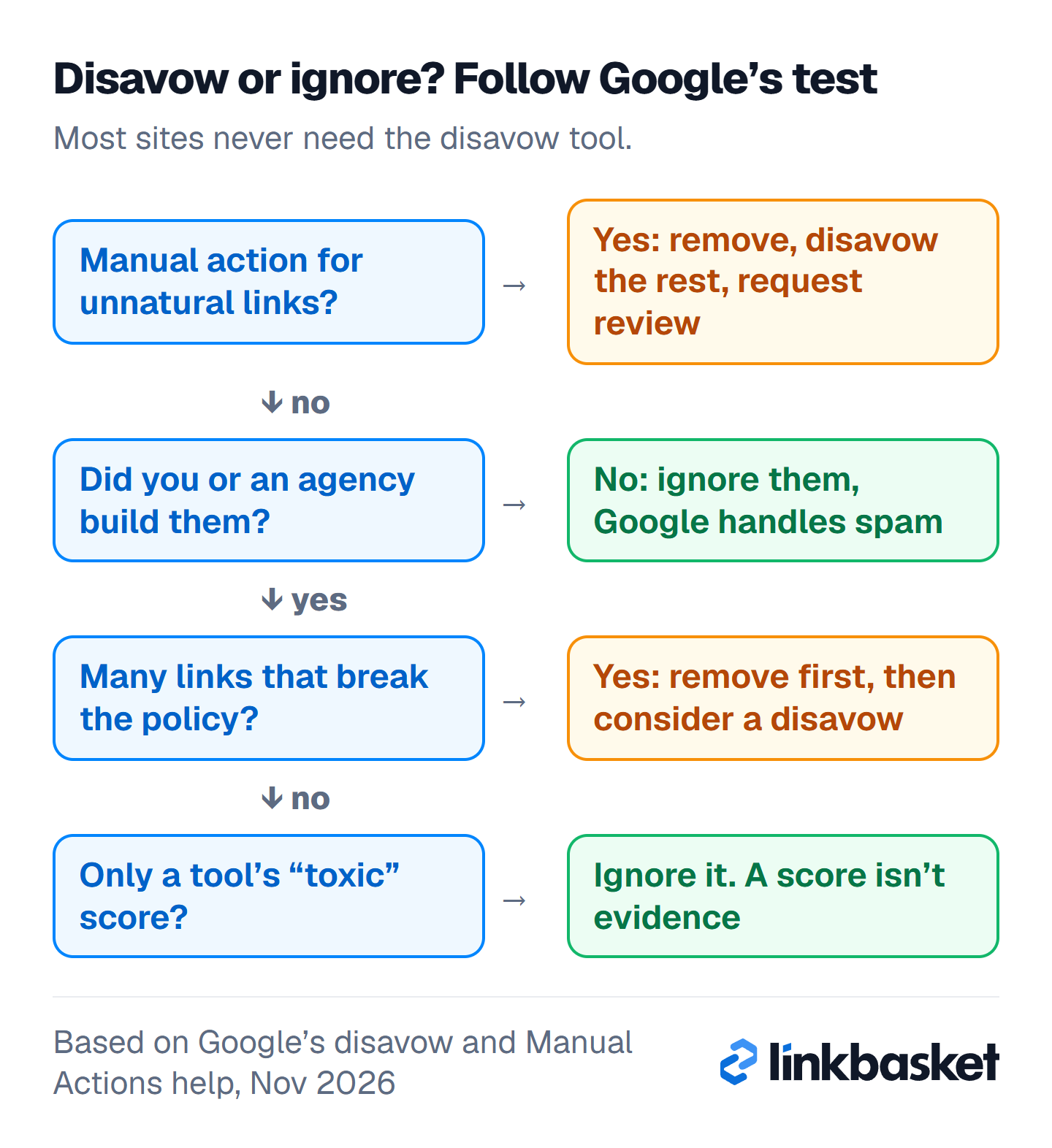
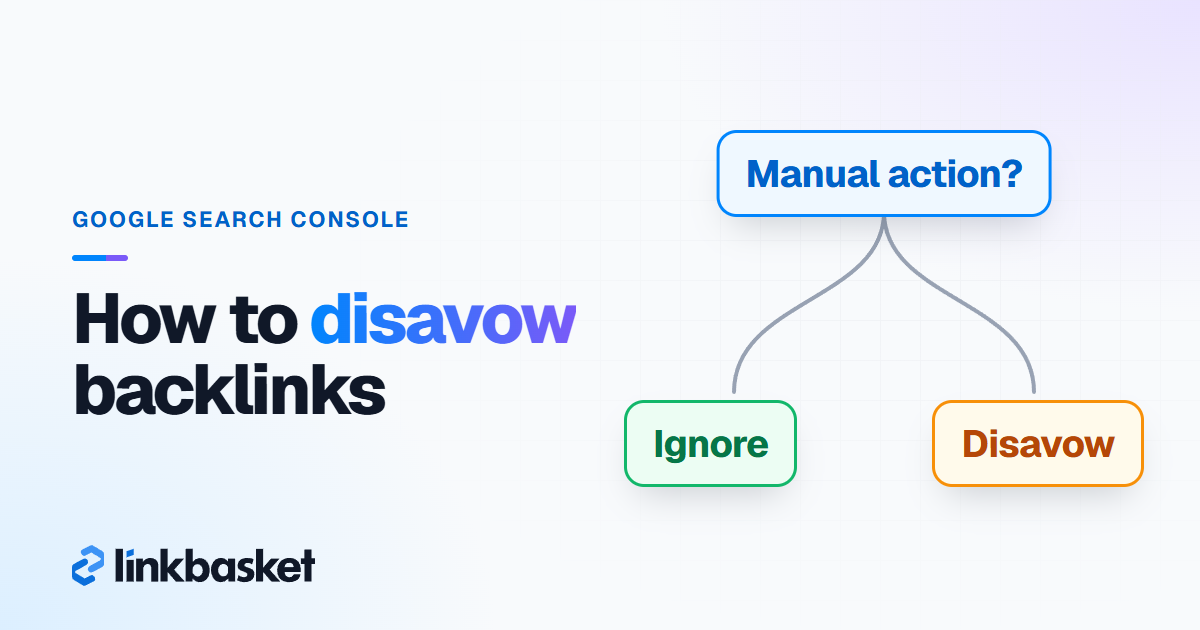
Start at the top of the tree. If you never built or bought the links, you stop at the second question.
What is disavow in SEO?
Disavowing in SEO means asking Google not to count specific links to your site when it assesses your site. You do it by uploading a list of URLs or domains through the disavow links tool in Search Console.
Nothing gets deleted. Those pages stay on the web, and they still appear in your Links report. Google simply discounts them. Think of it as a request that takes a few weeks to process.
Google calls it advanced. It means it.
Should you disavow backlinks or ignore them?
Ignore junk in most cases. Disavow only when you have many manipulative links, usually ones you or an agency built, and they have caused or will likely cause a manual action. That's Google's own test.
For years Google has said its systems handle most junk on their own. In December 2022, its link spam update post said Google was using SpamBrain "to neutralize the impact of unnatural links" (Google Search Central Blog). Bing went further. In September 2023 it announced it would scrap its own version that October, saying its AI could now tell natural from manipulative linking.
Walk through these questions in order:
- Does Search Console's Manual Actions report show "Unnatural links to your site"? Yes: remove what you can, disavow the rest, then request review. No: go to question 2.
- Did you, a past owner or an agency buy links or build them at scale through networks, link schemes or automated tools? Yes: go to question 3. No: ignore the links.
- Are there a lot of them, and do they break Google's link spam policy? Yes: remove what you can and consider a disavow. No: ignore them and stop that tactic.
Don't let a tool's "toxic" score decide it on its own. Tools guess. Google doesn't publish what it discounts, so a third-party score is one vendor's opinion about patterns, and when you treat it as a verdict you risk cutting links that were helping you.
What does a disavow decision look like in practice?
Find your row first.
| Situation | Disavow? | What to do instead or first |
|---|---|---|
| Random spam from scraper or foreign sites you never built | No | Ignore it. Google mostly neutralizes these. |
| A third-party tool shows a high toxic score | No | Check the links by hand. A score isn't evidence. |
| A negative SEO attack with thousands of junk links | Usually no | Watch the Manual Actions report. Act only if one appears. |
| Links bought from a network with exact-match anchors, no manual action | Maybe | Stop buying, ask for removal, disavow what stays if the volume is large. |
| Manual action: "Unnatural links to your site" | Yes | Remove first, disavow the rest, request review. |
| Paid links that carry rel="sponsored" or "nofollow" | No | Google says qualified paid links don't break its policy. |
How do you remove backlinks before you disavow?
Remove backlinks first by asking each site owner to delete the link or add a nofollow attribute. Google wants a good-faith removal effort before any disavow. The file is a fallback for whatever stubbornly stays up.
- Export your links. In Search Console, open Links, then click "Export external links".
- Mark what you built or paid for. Start with the top linking sites and the most recent links, as Google's manual actions help suggests.
- Find a contact for each site. An editor's email, a contact form or the WHOIS record. Skip the generic info@ inbox if a named editor exists.
- Send a short request. Give the exact page URL, the link and what you want removed.
- Log everything. Note the date, the reply and the result in a sheet. You'll need it for a reconsideration request.
- Follow up once after 7 days. Then move on; don't chase a site for months.
Keep the message plain. Most people miss how short it can be: "Hi, the article at [page URL] links to [your URL]. Could you remove the link or mark it rel="nofollow"? Thanks." No threats, no legal language.
How to disavow backlinks: the file format
The disavow file is a plain .txt file with one URL or domain per line. Google's rules, as of November 2026, are exact:
- Encoding: UTF-8 or 7-bit ASCII, and the filename must end in .txt.
- One entry per line: a full URL, or a whole domain written as
domain:example.com. - Comments: lines starting with
#are ignored. - Limits: 100,000 lines (blank and comment lines count) and 2 MB. Each URL can be up to 2,048 characters.
- No subpaths: you can't disavow a folder like example.com/en/. List the URLs, or the whole domain.
The three hard limits, at a glance:
- 100,000 lines at most, blank and comment lines included
- 2 MB maximum file size
- 2,048 characters per URL
A short example file:
# Network links bought in 2021, removal requested 2026-10-12, no reply
domain:spam-network-one.example
domain:spam-network-two.example
# Single page we couldn't get removed
https://some-blog.example/best-tools-list/
Prefer domain: for link networks. Spam sites often republish the same link on new pages. A URL line misses those.
How do you upload a disavow file in Search Console?
Upload the file in Google's disavow links tool: open the tool page, pick your property, click upload and choose your .txt file. Only owners can do it, not users with restricted or full access.
- Go to search.google.com/search-console/disavow-links.
- Select a URL-prefix property. The tool doesn't support Domain properties.
- Click the upload button and choose your file.
- Fix any errors flagged on screen. When a file has errors, the old list stays in place until you upload a clean one.
- Wait. A successful list can take a few weeks to kick in.
Three rules catch people out, and when you get one wrong the whole list can silently stop applying. Each property holds one disavow list, and a new upload replaces the old one, so always add to your last file rather than starting fresh. A list for example.com also covers m.example.com. And http and https are separate properties, so each needs its own list. To undo everything, open the tool and click "Cancel Disavowals".
How do you fix an unnatural links manual action?
Fix an unnatural links manual action by removing the links you can, disavowing the rest, and then clicking Request Review with your evidence. Google's Manual Actions report help lays out that order.
Skip the removal effort and your request may be rejected, per Google's help page. So the reconsideration request should show:
- Which links you found and how you found them
- The removals you got, with dates
- The sites that didn't reply or refused
- The disavow file covering the rest
- What you changed so it won't happen again
Reviews usually take several days or weeks, and link cases can run longer. An email arrives when it's done. Don't resubmit while one is pending; patience is cheaper than a second rejection.
Worked example: one manual action, start to finish
Every number here is hypothetical. Say you run an online shop with 900 referring domains, and you get an "Unnatural links to your site" manual action.
- Export: you pull all 900 domains from Search Console.
- Review: 150 come from a link package bought in 2023, with exact-match anchors on unrelated blogs.
- Removal: you email all 150. After two rounds, 40 remove the link, 10 add nofollow and 100 never reply.
- Disavow: your file lists those 100 as
domain:lines, plus a comment with the date of each request. - Request: you submit the review with the sheet of 150 sites, the 50 fixes and the file.
You leave the other 750 domains alone. Most are normal links. Disavowing them would throw away value for no gain.
Which edge cases change how you disavow backlinks?
Five situations change the steps. Skip the ones that don't apply to you.
- Domain properties: the tool won't accept them, so verify a URL-prefix property (say https://www.example.com/) to upload.
- Site migrations: links point at the old domain. Upload the list to the property those links point to.
- Old disavow files: a past agency may have uploaded a list. Download it first, because a new upload replaces it.
- Paid links with a sponsored tag: these follow Google's rules. Don't disavow them.
- Lost rankings after a core update: usually unrelated to your inbound profile. A file won't fix it.
How do you keep a clean profile after a disavow?
Keep it clean by stopping the tactic that caused the problem, building relevant links, and checking new links monthly. A disavow file fixes the past. It doesn't protect the future.
Once a month, when you open Search Console, sort Top linking sites by newest and skim for anything you don't recognise. If your site gets 20 new linking domains in a normal month and suddenly gets 300, find out why before you do anything. In practice it's often a scraper copying your posts, which Google tends to ignore, but a sudden burst can also mean an old vendor is still running a campaign in your name.
Update your disavow file only when you find new manipulative links that you, or someone acting for you, built. Then download the current file, append the new lines with a dated comment, and upload the combined list.
When should you call a specialist instead of disavowing?
Call a specialist in audits when you have a manual action with thousands of linking domains, a rejected reconsideration request, or an old disavow file you don't understand. Each domain needs a judgement call.
Don't disavow at all when you have no manual action, never bought links, and a tool's score is your only reason. In that case the risk of cutting good links outweighs any gain. When you do need a file, confirm these first:
- A manual action, or many manipulative links you or an agency built
- A removal request logged for every site you could reach
- The current disavow file downloaded, so nothing gets lost
- A URL-prefix property selected, not a Domain property
- Whole-domain lines for link networks
- No paid links that already carry sponsored or nofollow
And if you buy links, be clear about the rules.
When you buy, keep a record of every order. If a manual action ever lands, that record is the first thing a specialist asks for. Don't skip this step.
FAQ
Does Google still support the disavow tool?
Yes. As of November 2026, Google's help page still documents the disavow links tool for URL-prefix properties. Google says most sites don't need it and should use it only for manipulative links tied to a manual action, or likely to cause one.
How long does a disavow take to work?
Google says a successful upload can take a few weeks to be incorporated. A reconsideration review after a manual action takes several days or weeks, and longer for link cases. Don't expect a ranking change the day after upload.
Can disavowing links hurt my rankings?
Yes, if you disavow good links. Google warns the tool can harm your Search performance when used incorrectly. Disavow only links you're confident are manipulative, never a whole export.
How do I remove toxic backlinks?
Ask the linking site to remove the link or add nofollow, and log each request. If it stays and you have a manual action, add it to a disavow file. Random spam without a manual action can usually be ignored.
Next step
Check your Manual Actions report first. If it's clean and you didn't build the links, stop here. To understand your links before deciding, read our explainer on what a backlink profile is, then learn how to check backlinks with free tools. For safer link building from here on, see what makes a good backlink or browse the LinkBasket help centre.