Inbound links and backlinks are the same thing: links on other websites that point to yours. Referring domains are different. They count the separate websites those links come from, and for most decisions they matter more. If you track only one number, make it this one.
Last updated: November 9, 2026
Getting this wrong costs real money. If you compare competitors by raw backlink count, a single sitewide footer link can make a weak site look 10 times stronger than it is, and you'll budget for links you don't need. Below we settle inbound links vs backlinks, define referring domains, show how sitewide links distort counts, and give a clear verdict on which metric to track when.
Inbound links vs backlinks: is there any difference?
There's no difference between inbound links and backlinks; both mean a link from another website to yours. "Incoming link" means the same too. SEO tools use the words interchangeably.
Four terms get mixed up. Here they are side by side:
- Backlink: a link from another site to yours, seen from your side.
- Inbound link: the same link. Some older guides prefer this word.
- External link: usually a link from your site to another site, also called an outbound link. Context decides.
- Referring domain: a website that links to you at least once, counted once however many links it has.
The confusing one is "external link." Most people miss it. From your point of view, a backlink is an external link someone else made. So when you see "backlinks vs external links," people usually mean "links to me vs links from me." Our guide to what a backlink is shows the direction with a diagram.
What are referring domains in SEO?
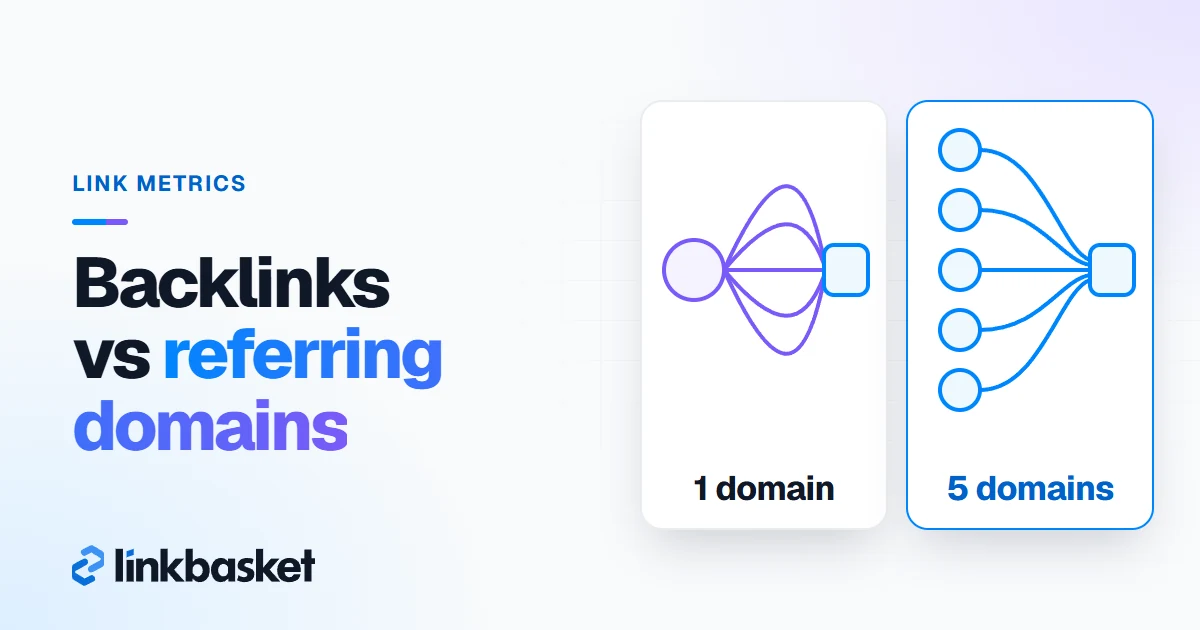
Referring domains in SEO are the unique websites that link to a page or site, each counted once. Take one blog that links to you 40 times. That's 40 backlinks. It's still 1 referring domain.
Tools count them slightly differently, so don't trust a number until you know which tool produced it. Ahrefs' SEO metrics glossary, checked November 2026, describes referring domains in its DR calculation as "unique referring domains that have at least one followed link pointing at the target website." So a site that links to you only with nofollow doesn't count toward DR. Google Search Console has no "referring domains" label, but its Top linking sites table groups links by root domain, so m.example.com and example.com/blog both show as example.com.
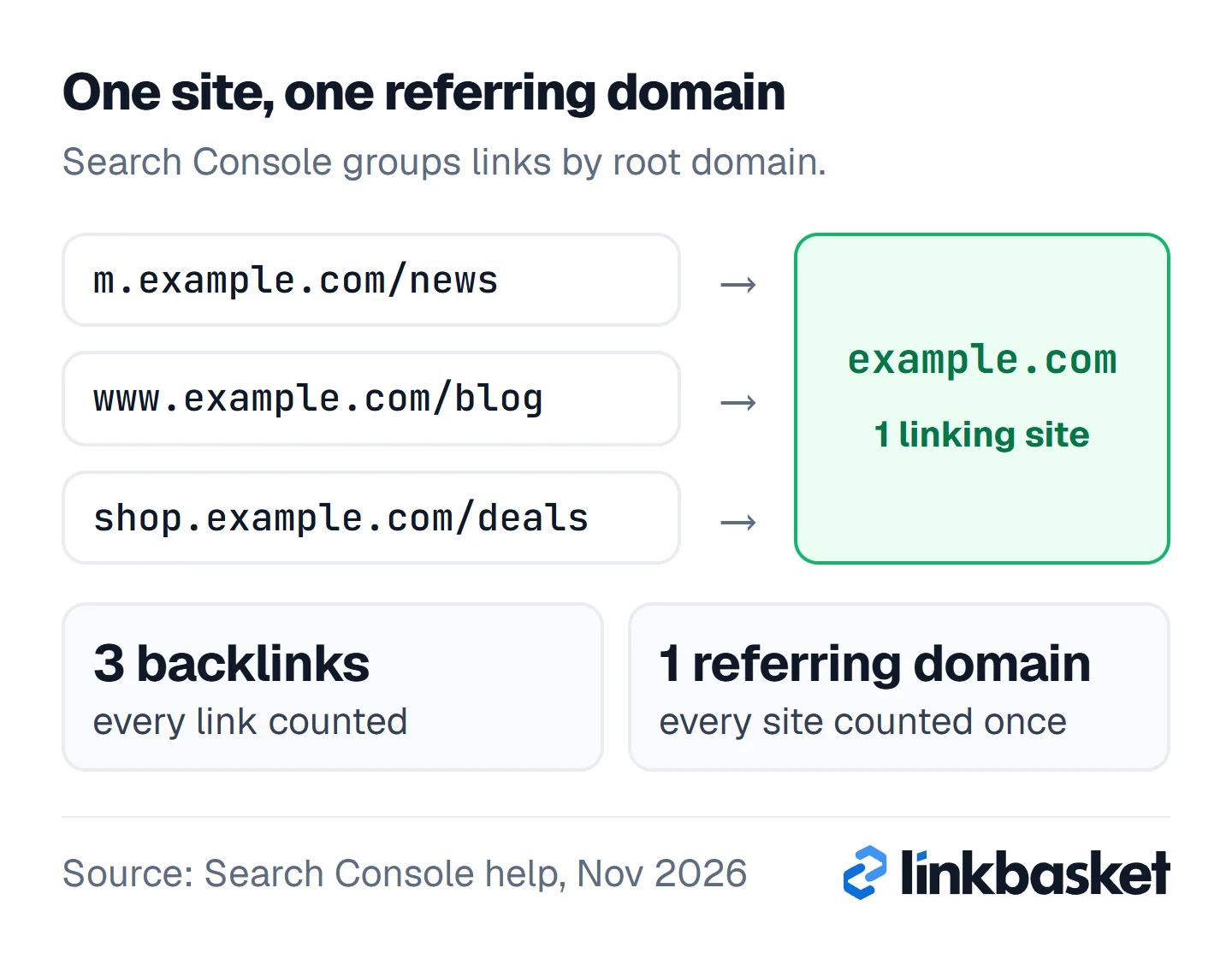
When you follow the three arrows, they land in one box. Three backlinks, one referring domain.
Backlink vs referring domain: what's the difference?
The difference between backlinks and referring domains: backlinks count every link, referring domains count every site. One site can send 1 link or 1,000; it's still 1 referring domain.
Here is a worked example with 3 sites, and every number in it is hypothetical. Say 3 sites link to you. A news site links once in an article. A niche blog links from 3 separate posts. A partner puts your link in its footer, and the partner site has 500 pages. Now look at your tool. It reports 504 backlinks from 3 referring domains. Over 99% of those backlinks come from one footer. One.
When you look at the bars, the first two barely register. Here is how the two metrics compare on the jobs you'll use them for:
| Criterion | Backlinks | Referring domains | Winner, and why |
|---|---|---|---|
| What it counts | Every single link | Every linking website | Depends on the question |
| Hard to inflate? | No; one sitewide link adds hundreds | Yes; each needs a new site | Referring domains |
| Compare competitors | Distorted by sitewide links | Shows breadth of support | Referring domains |
| Ahrefs KD and DR | Not the input | The input for both | Referring domains |
| Audit a single placement | Shows the exact URL and anchor | Too coarse | Backlinks |
| Track lost links | Shows each removed link | Shows lost sites only | Backlinks |
What's the common mistake in comparing backlink counts?
The common mistake is comparing sites by total backlinks, which rewards sitewide links and repeated links from the same few sites. Compare referring domains first, then look at backlinks for detail.
Here's a second hypothetical, this time with 2 competitors. Site A shows 12,000 backlinks from 90 referring domains. Site B shows 2,000 backlinks from 400 referring domains. Site A averages about 133 backlinks per referring domain; Site B averages 5. Site A has a few sites linking from every page. Site B has breadth: 4 times as many separate sites vouching for it, each of which chose to link on its own, which is a far harder thing to fake than a template change on a handful of friendly domains. Most of the time, B has the stronger link profile. It isn't close.
A very high backlinks-per-domain ratio isn't proof of anything bad. It's a prompt to look. When you open the top referring domains and see where the links actually sit, the story behind a scary-looking number is usually a theme credit, a partner footer or an old blogroll that nobody has touched since 2015.
How do sitewide links skew backlink counts?
Sitewide links skew backlink counts because a link in a footer, sidebar or blogroll repeats on every page of the linking site. A 2,000-page site with one footer link to you reports 2,000 backlinks from 1 referring domain.
Common sources:
- Theme or plugin credits ("Designed by…")
- Partner and sister-company footers
- Blogroll and "friends" lists in sidebars
- Paid footer links
The last one is a policy problem as well as a counting one. Skip the offer.
Why do referring domains matter more than backlinks?
Referring domains matter more than backlinks because each new site is a separate, independent vote, and the main link metrics are built on them. A second link from the same site tells search engines much less than a first link from a new one.
Three verified points back this up. We checked all 3 in November 2026:
- Ahrefs' glossary says referring domains "only count one link per website," so extra links from the same site don't raise DR.
- Ahrefs' Keyword Difficulty page says KD comes from "the number of referring domains the top 10 ranking pages have," and maps KD 50 to about 84 referring domains.
- Google Search Console reports linking sites by root domain, not individual links, in its Top linking sites table.
Google doesn't publish its rules here. Turns out you don't need them. But the PageRank idea, where weight is split among a page's links, already implies that one site saying the same thing 500 times isn't 500 times as convincing. Our guide on how many backlinks you need to rank uses referring domains for exactly this reason.
When do backlinks matter more than referring domains?
Backlinks matter more than referring domains when you're auditing specific links: checking a placement is live, fixing links after a URL change, reviewing anchor text, or spotting a sudden spike. Those jobs need link-level detail.
- Placement checks: you need the exact page, anchor and attribute. Nothing else will do.
- Site migrations: every backlink pointing at an old URL needs a redirect. Don't forget the old blog posts.
- Anchor text reviews: you count anchors across all links, not sites.
- Spike alerts: a jump of 3,000 backlinks overnight usually means a sitewide link or spam, and you'll want to know which.
A second link from a site that already links to you can still help in one case, and it's worth knowing. If it points to a different page of yours, it gives that page its first link from that site.
The verdict: which link metric should you track?
Track referring domains for strategy and backlinks for audits. Referring domains tell you how many separate sites support your page, which is what you compare, plan and report on. Backlinks tell you where each link sits.
Track referring domains to…
- Compare your site with competitors
- Set link targets for a keyword
- Report growth month over month
- Judge a site before buying a link
Track backlinks to…
- Check one placement is still live
- Find links to fix after a URL change
- Spot a sitewide or spam spike
- Review anchor text across links
Referring domains are the better metric for anyone comparing sites, setting link targets or reporting growth. However, if you're checking a specific placement, migrating URLs or reviewing anchors, backlinks are the right view.
When does the answer flip?
The answer flips to backlinks when you need link-level detail, and stays with referring domains for every comparison. Three scenarios switch it:
- If you've bought or earned a specific link, track that backlink until it's live and indexed.
- If you're changing URLs, export all backlinks so none points at a dead page.
- If one domain suddenly sends thousands of links, check the backlink list to find the sitewide or spam source.
Which external link building strategy adds domains?
An external link building strategy grows referring domains when it targets new sites rather than more links from the same ones. Each placement should add a new site. That's the whole rule.
Before you pitch or buy, check whether the site already links to you, because if it does, a second link adds little, and the same money spent on a site that has never mentioned you would add a brand-new referring domain instead. In practice, that budget almost always does more on a new domain. Digital PR, guest posts on new niche sites, partner pages and useful resources all add fresh referring domains. Our guide to the types of backlinks rates each method on value, risk and effort.
If you pay for placements, Google's spam policies treat links bought to manipulate rankings as link spam, so no paid dofollow link is risk-free. What lowers the risk is relevance, real organic traffic, an in-body link on an editorial site, a sponsored tag where the publisher adds one, and no link farms. Our guest posting service explains how ordering works.
Which edge cases change how you count referring domains?
Four edge cases change the count: subdomains, redirects, nofollow-only sites and networks of sites with one owner.
- Subdomains: Search Console strips subdomains and groups them under the root domain. Check how your other tool handles them before you compare numbers.
- Redirected domains: if a linking site moved to a new domain, its links can show under either name. Check both before you count it as new.
- Nofollow-only sites: Ahrefs leaves them out of DR, but they still send visitors.
- One owner, many domains: 10 sites run by one person look like 10 referring domains. If they exist only to link, Google calls it link spam. Plain and simple.
When should you call a specialist, and when not?
Call a link audit specialist if your referring domains jumped by hundreds in a week without explanation, or you have a manual action for unnatural links. Don't call anyone just because the backlink total looks odd. Check the top referring domains yourself first. It takes 10 minutes, and when you find a sitewide footer link behind the spike, you've saved yourself an audit fee. Here's the self-check:
- Sort referring domains by how many backlinks each one sends.
- Open the top 3 and find where the link sits.
- Look for footers, sidebars, blogrolls and theme credits.
- Note any site that seems to exist only to link out.
- Call a specialist only if the spike still has no explanation.
FAQ
Are inbound links and backlinks the same?
Yes. Inbound links, backlinks and incoming links all mean links from other websites to yours. The words are interchangeable in SEO tools and guides.
Is it better to have more backlinks or referring domains?
More referring domains, almost always. Frankly, it's not a hard call. 50 links from 50 relevant sites beat 500 links from 5 sites, because each new site is a separate vote and harder to fake.
What is a good ratio of backlinks to referring domains?
There's no official good ratio. A low ratio, under about 10 backlinks per referring domain, usually means varied, editorial links. A very high ratio is a signal to inspect sitewide links, not a verdict. Don't panic over it.
Do nofollow links count as referring domains?
It depends on the tool. Ahrefs counts only sites with a followed link toward DR. Search Console's Links report doesn't say whether a link is nofollow at all.
Next step: compare sites by referring domains
Check your top 3 competitors' referring domains, not their backlink totals. Then look for sites that link to them and don't link to you yet. That gap list is your plan. Our publisher inventory with referring domains shown lets you filter by DR, traffic and niche with a free account. To judge each site, use our backlink quality checklist, and to review your own links, see our guide to your backlink profile.